Left on Market

Your lyrics, synced to the transport.

A VST3 and Audio Unit plugin that reads your DAW’s playhead and shows the right words at the right moment — by section, or down to the exact line or word. Write your lyrics wherever you already write them; LyricBinder just keeps them in time.
Available now
VST3 & AU
Logic Pro ready
macOS 15+
Signed & notarized
47.4.1 Overview mode — sections on the left, the current lyrics on the right, both tracking the transport.

You already wrote the words. Something still has to scroll them.

Usually that something is a person — one hand on the mouse, dragging a PDF or a Doc down the screen while the singer waits on the downbeat. LyricBinder gives that job to the transport, which already knows exactly where the song is.

Features

Follows your playhead

LyricBinder reads bar, beat, tempo and play state straight from the host — not from a click track or an estimate. The current section scrolls into view as playback moves through the arrangement, and it catches up within about a second and a half no matter where you jump.

Bring your own lyrics

Point it at a Markdown file on disk, or connect a Google Doc. Your sections come from the headings you already wrote — pick which level counts, anywhere from Heading 1 to Heading 3, and everything under it becomes that section. No special syntax to learn, no import step. Edit in Typora, Obsidian, TextEdit, the included internal editor, or anything else, and the plugin picks up the change the moment you save.

Map sections to bars

In Arrange view, park the playhead where a section begins and hit Set to playhead. Repeats are first-class — a chorus is written once and mapped as many times as it returns — and anything left unmapped gets flagged rather than silently falling out of sync.
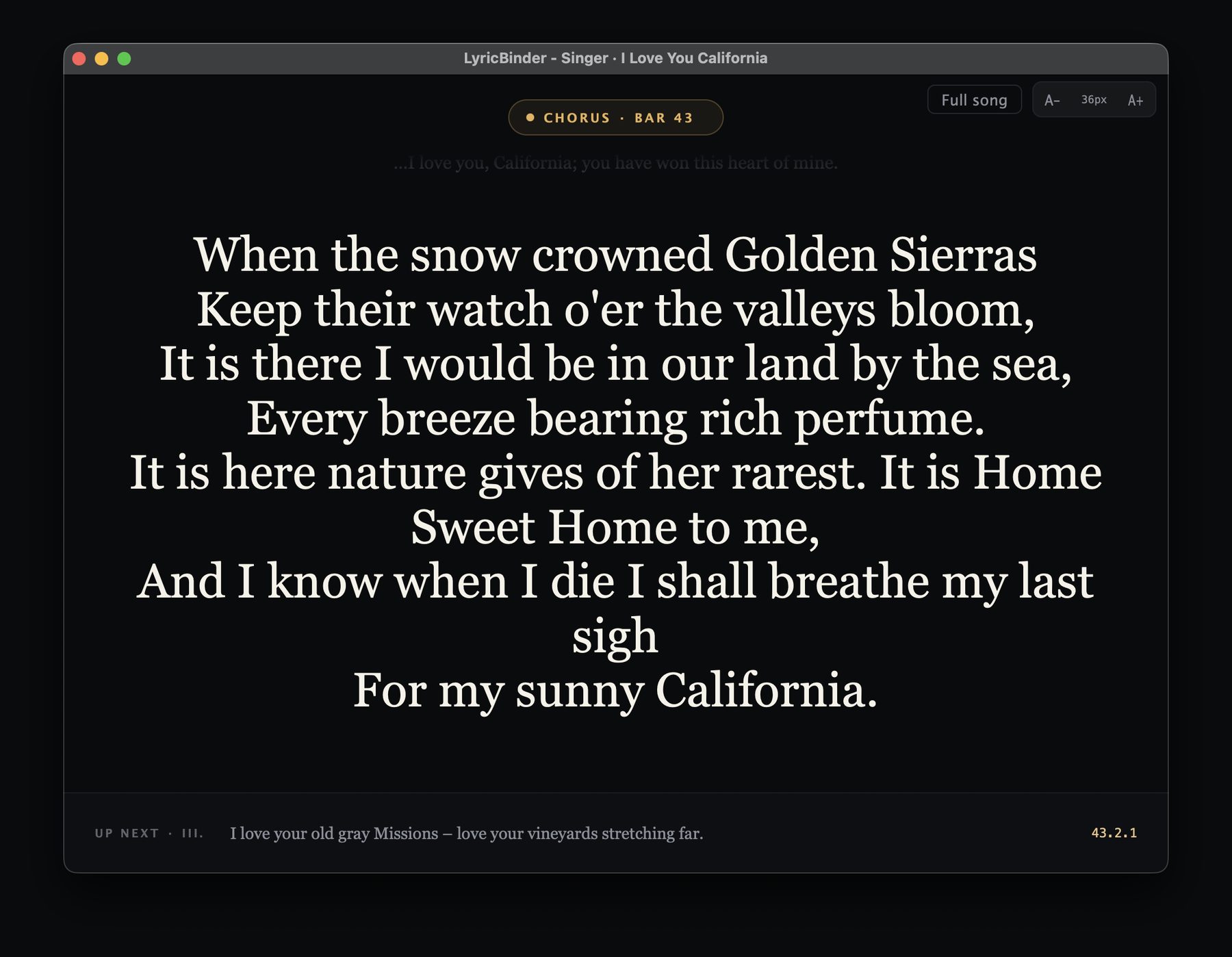
LyricBinder Singer view as a full-screen teleprompter, showing the current chorus in large serif type with the bar number and an up-next line at the bottom.

Singer view — a real teleprompter

A big, clean, distraction-free display for tracking vocals. Bump the font size, switch to full-song mode, or pop it out into its own window and drag it to a second screen or an iPad running as a display.

As simple, or as precise, as you want it.

Section-level tracking needs no setup at all — link a file, map your sections, press play. When a song needs tighter than that, precision is a layer you add on top, not a requirement you have to meet first.
Minimal setup

Section

The playhead drives it. The current section scrolls into view from your Arrange mapping, and that’s the whole configuration. Most songs never need more than this.
Optional

Keyswitch

Send MIDI keyswitches and LyricBinder highlights the exact line or word you’re on. Program them into the part, or hit them live from a controller while the singer tracks — you stay in control of the cue.
Optional - BETA

Melody

Point it at a MIDI clip of the vocal line and the highlight follows the notes. The melody you already wrote becomes the timing map — nothing extra to program, word by word.

Follow modes layer on top of section tracking rather than replacing it — so a song can be mapped roughly today and tightened to the word later, without redoing anything. Set it up once for a song you’ll perform a hundred times; skip it entirely for a demo.

One plugin, three modes.

Switch as the session changes — writing, mapping, or tracking a vocal.

Overview

Everyday tracking in a small plugin window. Section list on one side, the current lyrics on the other.

Arrange

Mapping sections to bars and spotting orphans. The bar ruler shows every timeline point at a glance.

Singer

Full-screen teleprompter, inline or detached to a second display. Built to be read from across a room.

Fits your setup

Light and dark themes, and a clean-text toggle that renders your document as plain lyrics when you don't want to see the formatting. An in-plugin notice tells you when a new version is out — the plugin never installs anything by itself.

Private by default

Anonymous usage stats are opt-in and off unless you turn them on. They never include your lyrics, section names, file names or paths, or your Google account. Turn them off any time from About — the identifier is deleted when you do. Read the policy.

What you need.

Requirement
Detail
Operating system
macOS 15 (Sequoia) or later
Processor
Apple Silicon or Intel
Plugin formats
VST3 and Audio Unit (AU)
Tested hosts
Logic Pro, Cubase, Ableton Live, Reaper, Studio One
Not yet available
Windows (built and tested, pending distribution), Pro Tools (AAX)
Lyric source
A Markdown file on disk, or a Google Doc you connect
A Windows build is finished and tested — it ships once we’ve worked through Microsoft’s distribution requirements. Pro Tools (AAX) is still on the roadmap. Get notified when they’re out.

Stop scrolling the lyric sheet.

Available now for macOS — signed, notarized, and it installs like any other Mac app.
One license, one person, up to 3 computers, and every update within version 1. No refunds after activation. See the terms of use.
Scroll to Top